 OpenCascade.js
Boolean logo
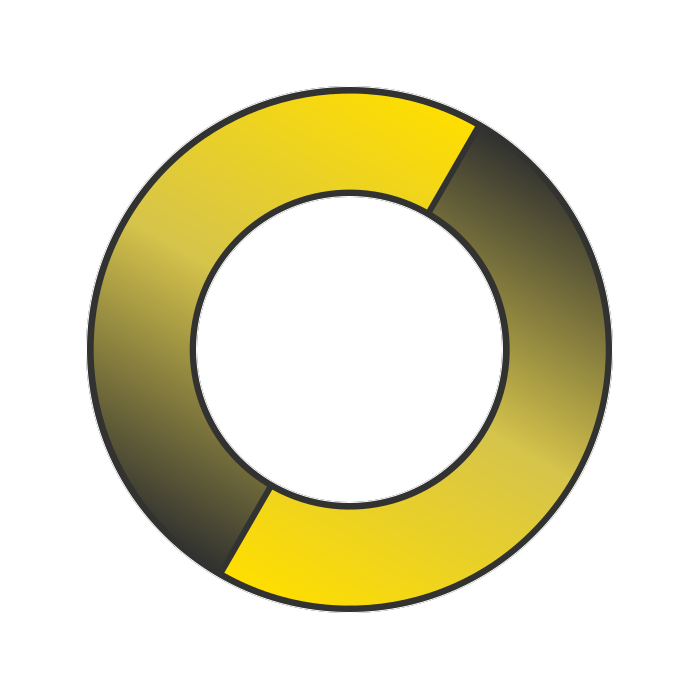
Build the OCJS logo with boolean cuts and rotations against a sphere.
A worked example of boolean operations — start with a sphere, cut it four times with translated and scaled copies, fuse a rotated duplicate, and visualise the result.
import type { TopoDS_Shape } from '@taucad/opencascade.js';
import { getOc } from './ocjs-init';

export const buildLogo = async (): Promise<TopoDS_Shape> => {
  const oc = await getOc();
  using sphere = new oc.BRepPrimAPI_MakeSphere(1);

  const makeCut = (shape: TopoDS_Shape, translation: readonly [number, number, number], scale: number) => {
    using tf = new oc.gp_Trsf();
    tf.SetTranslation(new oc.gp_Vec(translation[0], translation[1], translation[2]));
    tf.SetScaleFactor(scale);
    using loc = new oc.TopLoc_Location(tf);
    using progress = new oc.Message_ProgressRange();
    using cut = new oc.BRepAlgoAPI_Cut(shape, sphere.Shape().Moved(loc, false), progress);
    cut.Build(progress);
    return cut.Shape();
  };

  const cut1 = makeCut(sphere.Shape(), [0, 0, 0.7], 1);
  const cut2 = makeCut(cut1, [0, 0, -0.7], 1);
  const cut3 = makeCut(cut2, [0, 0.25, 1.75], 1.825);
  const cut4 = makeCut(cut3, [4.8, 0, 0], 5);

  const makeRotation = (rotation: number) => {
    const tf = new oc.gp_Trsf();
    tf.SetRotation(new oc.gp_Ax1(new oc.gp_Pnt(), new oc.gp_Dir(0, 0, 1)), rotation);
    return new oc.TopLoc_Location(tf);
  };

  using progress = new oc.Message_ProgressRange();
  using fuse = new oc.BRepAlgoAPI_Fuse(cut4, cut4.Moved(makeRotation(Math.PI), false), progress);
  fuse.Build(progress);
  const result = fuse.Shape().Moved(makeRotation(-30 * Math.PI / 180), false);

  // XCAF — per-subset PBR materials (brass + gray zones)
  using doc = new oc.TDocStd_Document(new oc.TCollection_ExtendedString_1());
  const shapeTool = oc.XCAFDoc_DocumentTool.ShapeTool(doc.Main()).get();

  using it1 = new oc.TopoDS_Iterator(result, true, true);
  for (; it1.More(); it1.Next()) {
    let i = 0;
    using it2 = new oc.TopoDS_Iterator(it1.Value(), true, true);
    for (; it2.More(); it2.Next()) {
      const newShape = shapeTool.NewShape();
      shapeTool.SetShape(newShape, it2.Value());

      const vmtool = oc.XCAFDoc_DocumentTool.VisMaterialTool(newShape).get();
      using visMat = new oc.XCAFDoc_VisMaterial();
      const matLabel = vmtool.AddMaterial(
        new oc.Handle_XCAFDoc_VisMaterial(visMat),
        new oc.TCollection_AsciiString(`logoMat${i}`),
      );
      vmtool.SetShapeMaterial(newShape, matLabel);

      using visMatPbr = new oc.XCAFDoc_VisMaterialPBR();
      if (i === 3) {
        visMatPbr.BaseColor = new oc.Quantity_ColorRGBA(0.6, 0.5, 0, 1);
      } else {
        visMatPbr.BaseColor = new oc.Quantity_ColorRGBA(0.3, 0.3, 0.3, 1);
      }
      visMat.SetPbrMaterial(visMatPbr);
      i++;
    }
  }

  return result;
};
What's happening
BRepPrimAPI_MakeSphere(1)builds a unit sphere.makeCutconstructs a transform (translate + scale), wraps it in aTopLoc_Location, moves a copy of the sphere, and subtracts it viaBRepAlgoAPI_Cut.- Four sequential cuts produce one half of the OCJS logo glyph.
BRepAlgoAPI_Fusewelds the half to a 180°-rotated copy of itself.- A final 30° rotation tilts the logo.
The takeaway: boolean operations allow you to create highly complex shapes that would be difficult or impossible with classical polygon-based modelling.
Render it
const logoShape = await buildLogo();
const glb = await shapeToGlb(logoShape);
renderGlb(canvas, glb);
See Render with three.js for the GLB → three.js wiring. See also Visualize shape helper.